
All free tools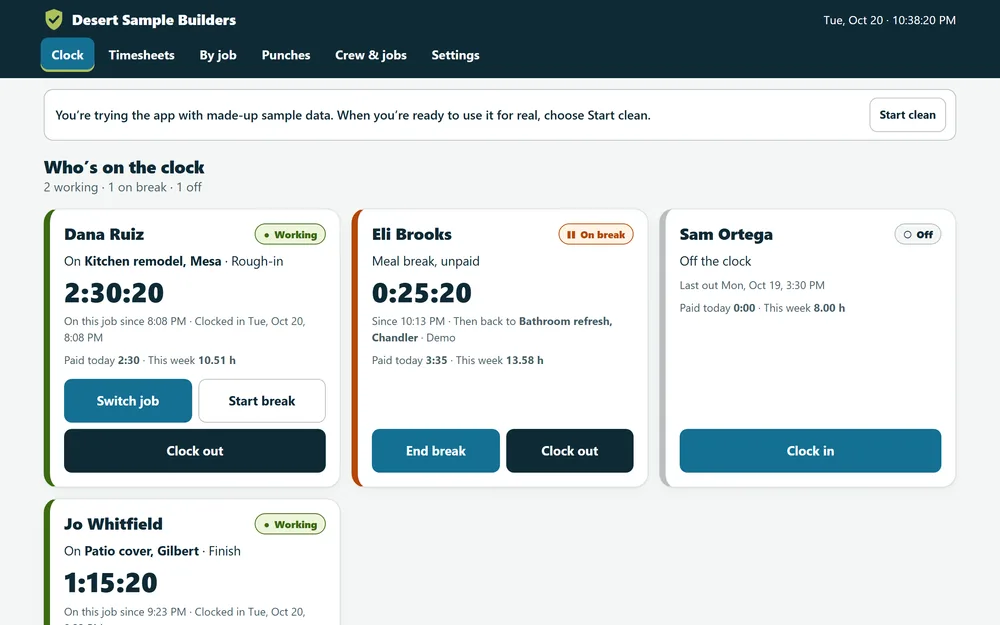
Free tool · Download and own
Time cards that add themselves up.
Set one tablet or laptop in the shop or the truck. Your crew taps in, picks the job, takes breaks and taps out. At the end of the week you get hours by person and by job, overtime already split out, and a timesheet each person can sign.
- Overtime follows the rules you pick: federal (Arizona and most states), California, Alaska, Colorado or Nevada. It’s an estimate, so check your state’s rules before you run payroll.
- It runs on one shared device. A 4-digit PIN stops people from tapping the wrong card, but it isn’t a lock. Every hand edit asks for a name and a reason and goes in a change log.
- There’s no GPS and no photo check. It records when someone tapped in, not where they were standing.
- It’s not a payroll service. It gives you totals and a CSV for your payroll provider or bookkeeper. It doesn’t pay anyone or file taxes.
- Your records stay in the browser on that device. Nothing is sent to us. Back it up weekly from Settings.
Crew Time Clock
- A big tap-in card for each person, for crews of 1 to 15
- Clock in by job and cost code, switch jobs, and take paid or unpaid breaks
- Weekly timesheets with regular, overtime and double time
- Hours and labor cost by job and cost code
- Signed, printable timesheets and a payroll CSV
- Your own business name and colors. No account, no monthly fee
- 1. Save it somewhere you’ll find it, like Documents or your desktop.
- 2. Double-click it. It opens in your web browser, with or without internet.
- 3. Back it up from Settings once a week. Your records live in that browser on that computer, so a backup file is your safety net.
Want a website that works this hard for you?
We’ll design your homepage free. You see it before you spend a dollar, and the design is yours to keep either way.